ConvertDuck

Make Uzbekistan Visa Photo

Uzbekistan's e-visa takes a 35x45mm photo at 300 dpi, uploaded as a JPG under 1MB. The uploader checks the filename, so a JPEG saved as .jpeg is refused — it has to end in .jpg.

Upload PhotoJPG, PNG

Uzbekistan Visa Photo (35x45mm)

Standard Example

Precise Face Alignment

  • 1

    Fit your head inside the guide

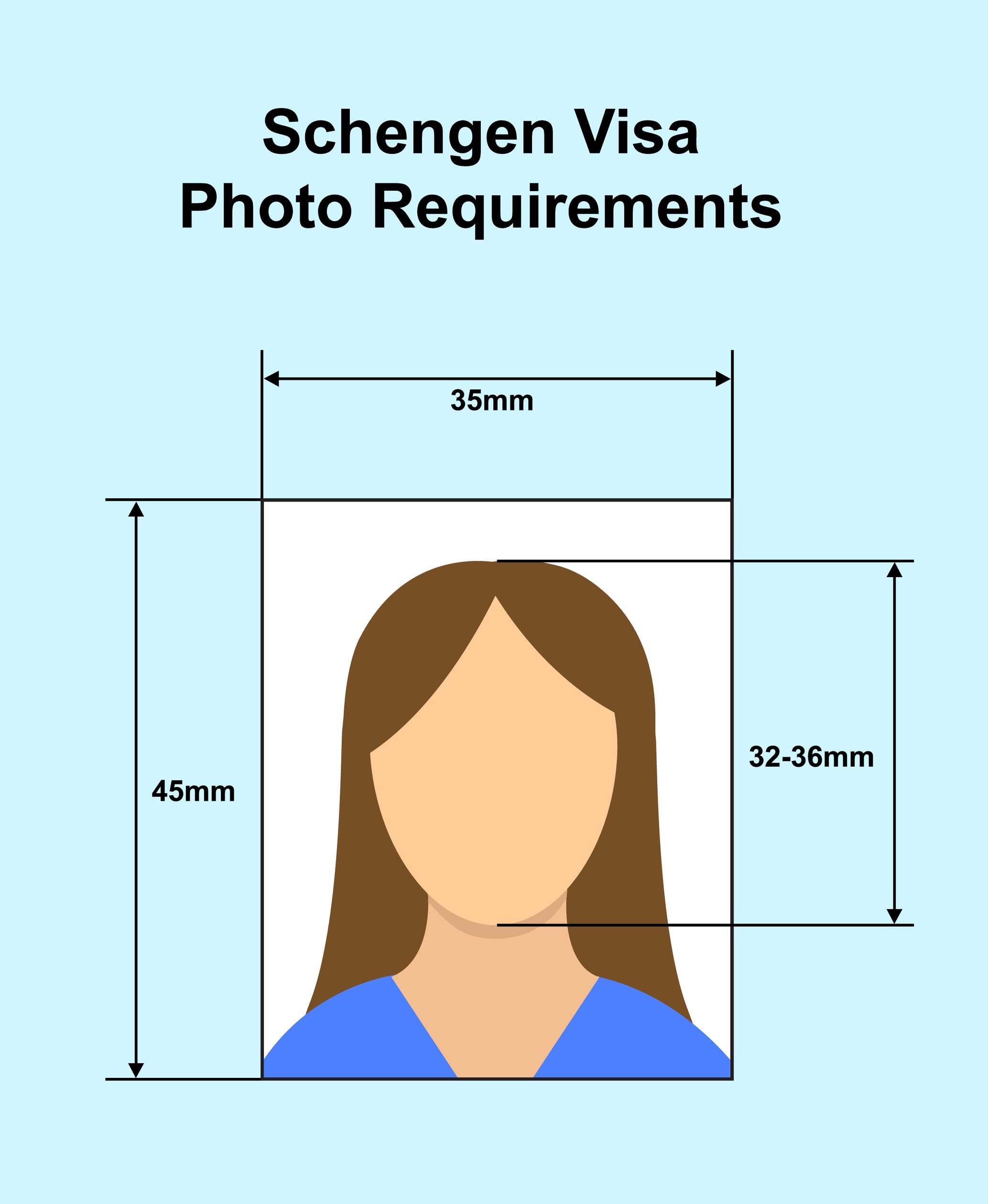
    Chin to crown should measure 32-36mm.

  • 2

    Center your face on the vertical line

    Head straight, looking at the camera.

  • 3

    Keep the background plain

    Light and even, with no shadow.

Specifications

The 35x45mm format used for Uzbek e-visa applications.

Dimensions35 x 45mm at 300 dpi
File.jpg only, under 1MB
BackgroundPlain light, no shadows
Checked byAutomated ICAO validation

Compliance Checklist

  • Filename must end in .jpg

    The uploader compares the extension as text — .jpeg is rejected even though it is the same format.

  • Under 1MB

    Compress rather than shrinking the image.

  • Neutral expression

    Mouth closed, both eyes open.

  • Taken within the last 6 months

    Must reflect your current appearance.

At least

35 x 45mm at 300 dpi, under 1MB, and the filename must end in .jpg — the uploader compares the extension as text, so a JPEG named .jpeg is refused. The portal then runs an automated ICAO check and rejects anything that fails it

Uzbekistan Visa Photo Requirements, Explained

35x45mm at 300 dpi, under 1MB — and the file has to be named .jpg, not .jpeg.

Quick Check: Do's & Don'ts

Not .jpeg

The extension is compared as text. Rename it .jpg.

No PNG or HEIC

The e-visa portal takes .jpg only.

Standard 35x45mm

300 dpi, the same size as a European passport photo.

Keep It Under 1MB

Check the file size before uploading.

It Has to Be Named .jpg

The check reads the filename, not the file.

Uzbekistan's e-visa portal accepts .jpg files only, and the check is literal: the uploader splits the filename and compares the extension as text. A perfectly valid JPEG saved as photo.jpeg is refused, because the string after the dot is not exactly "jpg".

That is worth knowing because plenty of software writes .jpeg by default. If your file is rejected and you cannot see anything wrong with the photo, look at its name before you retake it.

PNG, HEIC and PDF are refused regardless of quality — and HEIC is what modern iPhones produce by default, which is the other common stumbling block.

The 1MB Ceiling

Roomier than the frame suggests.

The portal's own guidance asks for 35x45mm at 300 dpi and states that the image must not exceed 1 Mb. The upload component enforces exactly that, flagging anything over 1MB before it is sent.

A 35x45mm frame at 300 dpi is about 413 x 531 pixels, which lands well under the ceiling at ordinary JPEG quality. You should not need to fight the limit — reduce quality rather than pixel dimensions if you do.

An Automated ICAO Check

The portal grades the photo before a person sees it.

Uzbekistan states that the uploaded face image must comply with the recommendations of ICAO Doc 9303, and the portal backs that with an automatic check — a failing upload comes back as "not compliant to the ICAO standards" rather than as a human comment.

In practice that means the usual ICAO geometry is not advisory here: face square to the camera, neutral expression, eyes open and unobscured, even lighting, no shadow behind the head.

Size & Head Height

35x45mm with a 32-36mm head.

Uzbekistan uses the standard 35x45mm photo, so the crop is the same shape as a European passport photo — it is the file rules that differ.

Your head should measure roughly 32-36mm from chin to crown, centred, with a small gap above the hair.

Note that the passport data page you upload alongside the photo is a separate file with its own limit — the portal asks for that scan to stay readable and under 500 Kb.

What You'll Actually Download

Printed at 35 x 45mm, 827 x 1063px, JPG/PNG. Computed from this photo's own specification, not typed by hand.

How you submitUpload a fileSubmitted through: e-visa.gov.uz (MFA Consular Department)
Pixel size
827 x 1063px @ 600dpi
Print size
35 x 45mm (3.5 x 4.5cm / 1.38 x 1.77 in)
File type
JPG / PNG
Background
White

Requirements verified · Source: e-visa.gov.uz

Watch out — At least 35 x 45mm at 300 dpi, under 1MB, and the filename must end in .jpg — the uploader compares the extension as text, so a JPEG named .jpeg is refused. The portal then runs an automated ICAO check and rejects anything that fails it

Uzbekistan Visa Photo Maker (35 x 45mm)

Create the 35x45mm photo Uzbekistan's e-visa needs — 300 dpi, .jpg under 1MB, plain background, free and 100% private.

Get Your Photo in 3 Steps

1. Upload Your Photo

Choose a clear, recent photo from your phone or computer.

HEIC from an iPhone is fine as input — we export JPEG.

2. Auto Alignment

We crop to 35x45mm with your head at 32-36mm.

Stand a metre from a plain, evenly lit wall.

3. Download & Upload

Save the file and attach it to your e-visa application.

Make sure the name ends in .jpg, not .jpeg.

Uzbekistan Visa Photo Specifications

Dimensions35 x 45mm (3.5 x 4.5cm) at 300 dpi
Head Height32 - 36mm, chin to crown
File.jpg only, under 1MB
BackgroundPlain light, no shadows
ValidationAutomated ICAO Doc 9303 check

Frequently Asked Questions

Q.What format does the Uzbekistan e-visa accept?
.jpg only, and the check is on the filename rather than the file. The portal splits the name and compares the extension as text, so a valid JPEG saved as photo.jpeg is refused. PNG, HEIC and PDF are rejected too — HEIC being what modern iPhones produce by default.
Q.What size is the photo?
35x45mm at 300 dpi, the same size as a European passport photo, with the head at 32-36mm from chin to crown. That works out to roughly 413 x 531 pixels.
Q.How big can the file be?
Under 1MB. The portal's guidance states the image must not exceed 1 Mb and the upload component enforces it before the file is sent. At 300 dpi you will land well under it without trying.
Q.Why was my photo rejected without an explanation?
The portal runs an automatic ICAO Doc 9303 check, so a failure comes back as "not compliant to the ICAO standards" rather than as a specific comment. Face square to the camera, neutral expression, eyes open and unobscured, even lighting and no shadow behind the head.
Q.Can I use a spare Schengen visa photo?
The size matches, but check the file is named .jpg, is under 1MB, and was taken within the last six months.
Q.Is the passport scan subject to the same limit?
No, it is a separate file. Uzbekistan asks for the data page of your travel document to be readable and under 500 Kb.