ConvertDuck

Make Maldives Visa Photo

35x45mm on a plain light background. Worth knowing first: most visitors get a free visa on arrival and need no photo at all — this frame is for work, business and resident permits.

Upload PhotoJPG, PNG

Maldives Visa Photo (35x45mm)

Standard Example

Precise Face Alignment

  • 1

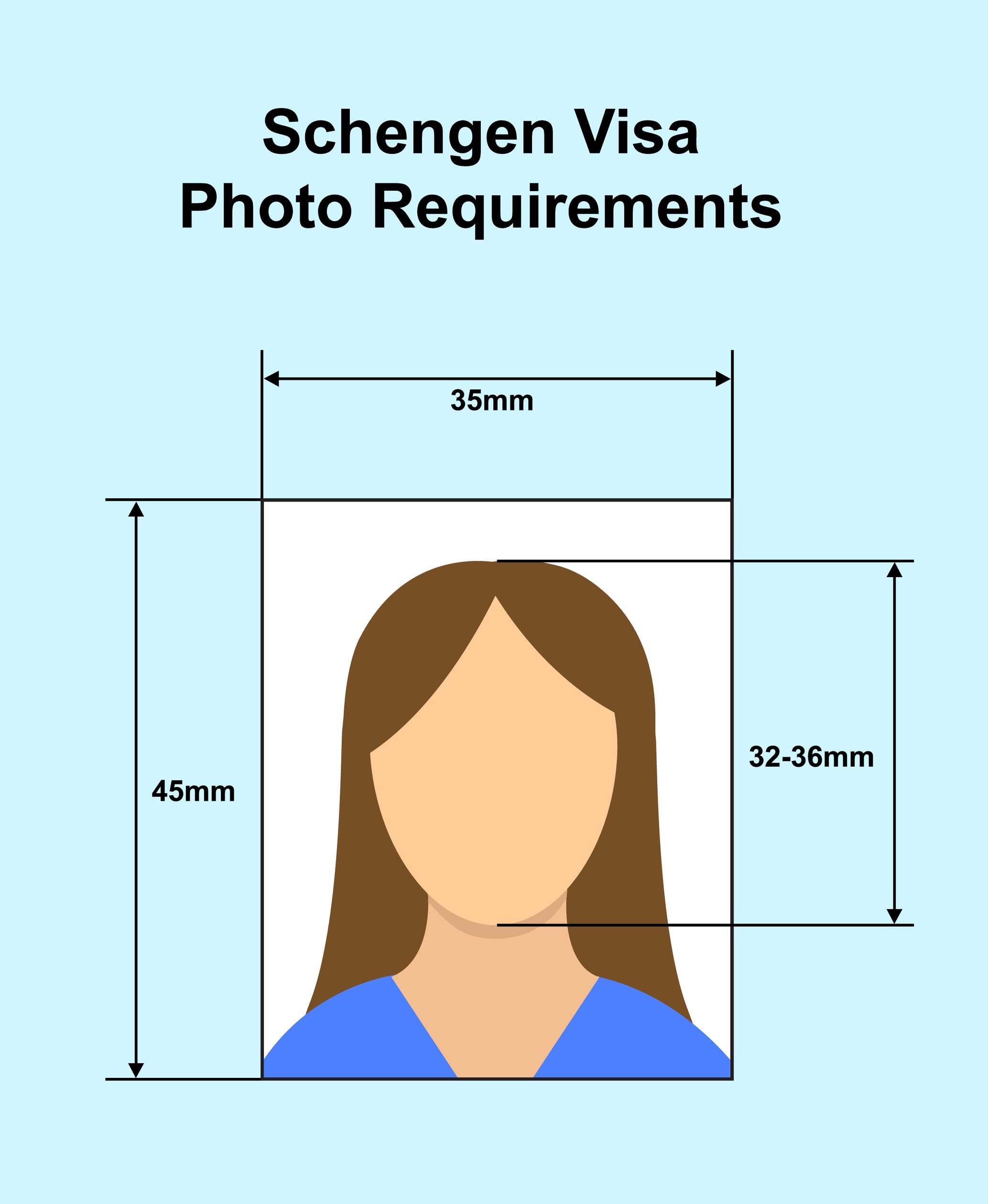
    Fit your head inside the guide

    32 to 36mm chin to crown.

  • 2

    Leave about 3mm above your hair

    A small gap to the top edge.

  • 3

    Use a plain light background

    White is the safe default.

Specifications

The 35x45mm frame published in the Maldives Immigration photo standards.

Dimensions35 x 45mm
Head Height32 - 36mm
Top Margin≈ 3mm above hair
BackgroundPlain white or light

Compliance Checklist

  • Check you actually need a photo

    Tourist visa on arrival is free and needs none.

  • Plain uniform background

    No patterns, shadows or other people.

  • JPEG under 2MB for uploads

    Portal submissions are size-capped.

  • Neutral expression, mouth closed

    No smiling or teeth showing.

Maldives Visa Photo Requirements, Explained

The honest first answer: if you are going on holiday, you probably don't need this photo. The 35x45mm frame matters for work, business and resident permits.

Quick Check: Do's & Don'ts

Tourists Usually Need No Photo

The free visa on arrival is granted at the airport without a photograph.

35 x 45mm, Plain Light Background

Head 32-36mm with about 3mm above your hair.

No Smiling or Teeth

Neutral expression with the mouth closed.

Do You Actually Need This Photo?

Tourist arrivals are handled without one.

The Maldives grants a free visa on arrival to visitors of most nationalities, issued at the airport on presentation of a valid passport, onward ticket and confirmed accommodation. No photograph is submitted for it.

So if you are travelling as a tourist, the answer is usually that you need nothing from this page. It is worth saying plainly, because a lot of guidance online implies a Maldives visa photo is a standard travel requirement when for most visitors it is not.

Where the 35x45mm photo does matter is the permit routes: work permits, business visas, resident permits and extensions handled through Maldives Immigration, including submissions made through its online systems. If that is your situation, the requirements below apply.

The 35x45mm Frame

Head 32-36mm with roughly 3mm above the hair.

Maldives Immigration publishes its photo standards at a 35 x 45mm frame — the same size used across Europe, India and much of Asia. Your head should measure between 32mm and 36mm from the bottom of your chin to the top of your hair, filling roughly 70-80% of the height.

Leave about 3mm of clearance between the top of your hair and the top edge of the photo. Sources differ slightly on the exact head figure at the low end, quoting 31mm in some places and 32mm in others; the guide on this page is set at 32-36mm, which sits safely inside every published reading.

Face the camera directly with your head straight, showing your head and the top of your shoulders.

Uploads: JPEG Under 2MB

The portal caps file size.

For online submissions the photo should be a JPEG under 2MB. That is a generous ceiling compared with countries like Kazakhstan or Pakistan, which cap at tens of kilobytes, so you should not need to sacrifice quality to fit it.

Do keep working from the original camera file rather than a copy that has been through a messaging app. Recompression costs sharpness, and since you have 2MB to play with there is no reason to submit a soft image.

Background & Expression

Plain and uniform; neutral face.

The background must be plain and uniform — white or light-coloured — with no patterns, textures, shadows or other people visible. White is the safe default and what this page produces. Stand about a metre clear of the wall so your shadow falls behind you.

Keep a neutral facial expression: no smiling, no smirking, no teeth showing. Mouth closed, both eyes open, looking straight into the lens.

What You'll Actually Download

Printed at 35 x 45mm, 827 x 1063px, JPG/PNG. Computed from this photo's own specification, not typed by hand.

How you submitUpload a fileSubmitted through: Maldives Immigration
Pixel size
827 x 1063px @ 600dpi
Print size
35 x 45mm (3.5 x 4.5cm / 1.38 x 1.77 in)
File type
JPG / PNG
Background
White

Requirements verified · Source: immigration.gov.mv

Maldives Visa Photo Maker (35x45mm)

Create the 35x45mm photo Maldives Immigration permits need — head 32-36mm, plain light background. Free and 100% private.

Get Your Photo in 3 Steps

1. Check You Need One

Tourist visa on arrival is free and requires no photograph.

This frame is for work, business and resident permits.

2. Upload & Auto Align

We crop to 35x45mm with your head at 32-36mm.

Leave about 3mm above your hair.

3. Download & Submit

Attach the JPEG or print it for your application.

Uploads should stay under 2MB — ours do easily.

Maldives Visa Photo Specifications

Dimensions35 x 45mm (3.5 x 4.5cm)
Head Height32 - 36mm, face 70-80% of frame
Top Margin≈ 3mm above the hair
BackgroundPlain white or light, uniform
Upload LimitJPEG under 2MB

Frequently Asked Questions

Q.Do I need a photo for a Maldives tourist visa?
Usually no. The Maldives grants a free visa on arrival to visitors of most nationalities at the airport, on presentation of a valid passport, onward ticket and confirmed accommodation — no photograph is submitted. The 35x45mm photo is for permit routes instead.
Q.What size is a Maldives visa photo?
35 x 45mm (3.5 x 4.5cm), with your head measuring 32-36mm from chin to crown and filling roughly 70-80% of the frame, plus about 3mm of clearance above your hair.
Q.Which applications actually need it?
Work permits, business visas, resident permits and extensions handled through Maldives Immigration, including its online submission systems. Check your specific application's checklist.
Q.What file size can I upload?
A JPEG under 2MB. That is a generous limit compared with portals that cap at tens of kilobytes, so work from your original camera file rather than a compressed copy — there is no need to submit a soft image.
Q.Does the background have to be pure white?
Plain and uniform is the requirement, described as white or light-coloured. No patterns, textures, shadows or other people. White satisfies every reading and is what this page produces.
Q.Can I smile?
No. Keep a neutral expression with your mouth closed — no smiling, smirking or showing teeth — with both eyes open and looking straight into the camera.